OPSF is a simple Link State dynamic routing protocol that uses cost as its cost function to determine best paths for traffic.
Configuration
Basic Configuration
R1(config)# router ospf 1
R1(config-router)#network 10.0.0.0 0.0.0.255 area 0

-- verification:

R1#sh run | section ospf
R1#show ip protocols
R1# show ip ospf interface brief
R1#show ip ospf neighbor

-- advanced
R1(config-router)#router ospf 1
R1(config-router)#router-id 2.2.2.2
R1#clear ip ospf process -- used to restart the OSPF process
R1(config-router)#passive-interface loopback 0
R1(config-router)#passive-interface f2/0
Detailed Configuration
The first command, starting from global config, is router ospf <int: proc id> to enter the router configuration mode.
Note
Difference interfaces can run in different instances of OSPF, and each instance will have its own Link State Database. However, only a single instance is typically configured, and multiple process IDs are very rarely used.
The more common set up is that we use the same process ID across all routers (although this isn’t technically necessary at all).
The next command is to use the network command, which, much like in EIGRP, uses a wildcard mask. Additionally, with OSPF we must include an area argument.
Note
Unlike EIGRP, OSPF requires the wildcard mask - it will not default to classfull boundaries.
OSPF also uses Router-IDs that are in the form of an IP address, much like EIGRP:
Note
When injecting routes into OSPF, they will show up as
O*E2in the Routing Table. This means they are an external route - meaning that the route was redistributed into OSPF. In this context, redistribution refers to the process of taking a route from another source (either a different protocol or a static route) and inserting it into OSPF.
Areas
Because Link State routing protocols allow each router to learn the full picture of the network, including every router, its interfaces, and what they are connected to, large set ups can lead to some issues:
- Too many routes can use up too much router memory
- Network changes can cause all routers to reconverge, which takes time and CPU resources
To solve this, OSPF supports a hierarchical design can breaks down large networks into smaller areas; each router will have full information about its own area, but only summary information about other areas.
This means that network changes don’t require reconverging throughout the network, Routing Table data will be kept to a minimum, and links going down in other areas won’t affect every router (only those in the affected area).
Topology
OSPF Areas are broken down into a two-level hierarchy: the transit area (known as the backbone or Area 0) and regular areas (non-backbone areas).
The transit area is generally reserved for admin and transit usage, and thus does not generally contain end users. Regular areas are connected to end users, and all transit traffic is then routed via the Transit area.
Note
In general, ,all traffic from non-backbone areas must pass via the backbone area; we cannot connect regular areas directly to each other.
Configuration
The area is configured at the interface level using the Network command,:
R1(config-router)# network 10.0.0.0 0.0.255.255 area 0
Note
For a router to form an adjacency, its neighbor must be configured to be in the same area.
OSPF router Types
Backbone routers
Backbone routers are those that have all their OSPF interfaces in Area 0, and they maintain a full LSDB of other routers and links in their own area.
Routes recieved from other routers in the same area will appear as Internal OSPF routes, indicated by O.
Area Border Routers (ABRs)
Routers that have interfaces in multiple areas are known as Area Border routers. They have the following characteristics:
- They separate LSA flooding zones - this is what segregates and compartmentalize the network.
- They are the primary point for area address summarization
- They are regularly the source for default routes
- They maintain the LSDB for each are they are connected to.
Ideally, each ABR is connected to two areas only: the backbone and another area. If more connections are needed, 3 areas are the upper limit.
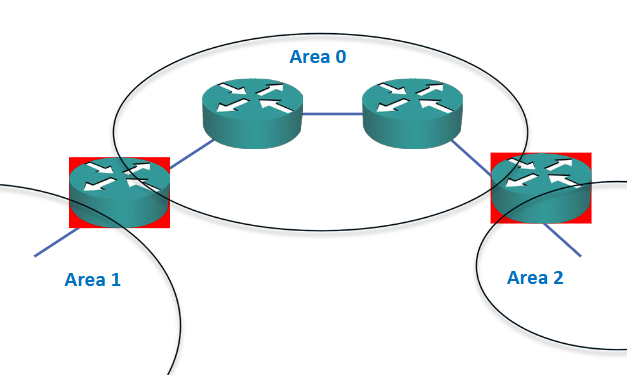
In the image above, the router on the left has the full LSDB for areas 0 and 1, but only summary routes for links in area 2; likewise, the router on the right has a full database of links in area 0 and 2, but only summary for area 1.
Warning
ABRs do not automatically summarize; we need to configure summarization ourselves, else all routes will be flooded everywhere.
Whenever we have routes to other areas, they will be displayed as O IA routes (meaning OSPF Inter Area routes).
Manual summarization
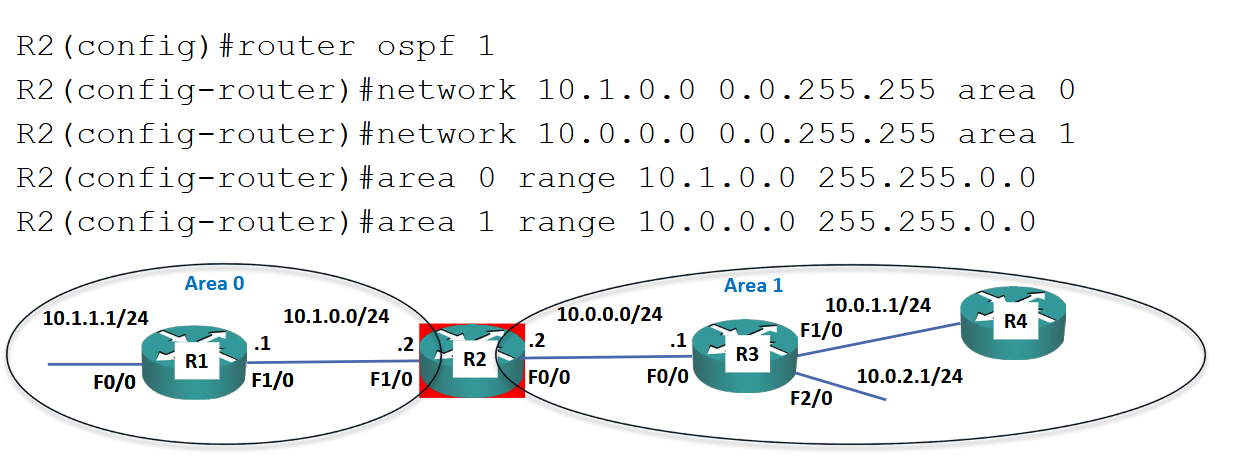
Note
When creating areas using the
networkcommand we must use wildcard masks. On the other hand, when create summary routes for specific areas (using theareacommand) we include the network range using a subnet mask
Autonomous System Boundary Routers (ASBRs)
Another type of router is the ASBR - these are routers that run OSPF and redistribute other protocols into OSPF. That is to say, these routers have routes learned from Routing Information Protocol (RIP), Enhanced Interior Gateway Routing Protocol (EIGRP), Static Routes, etc and then inject those routes into the OSPF system.
These are known as O*E2 routes in the Routing Table, meaning they are external routes.
Note
An external route does not mean it is from outside the organization network; it is external to OSPF and is injected into the system,.
Characteristics
OSPF is a Link State routing protocol that supports large networks with very fast convergence time. It uses multicast for messaging. To determine the “best path” it uses Dijkstra’s algorithm.
When passing routing updates and creating topology maps, OSPF routers with LSA Link State Advertisements to pass on routing updates.
OSPF Operations
When OSPF is installed on a route, it will do the following:
- Discover neighbours
- Form IGP adjacencies -
show ip ospf neighbor - Flood Link State Database (LSDB) -
show ip ospf database - Computer shortest path
- Install best routes in Routing Table -
show ip route - Respond to network changes
OSPF Packet Types
As soon as OSPF is installed it will send out and listen to Hello packets, which are used to form adjacencies. Once formed, OSPF routers then send DBD (DataBase Description) packets to their neighbours - these packets include all the network information that the router knows about.
The LSR (Link State Request) packet is used by a router to request missing information about any of the networks recieved in the DBD. In this case, the reply is sent as an LSA (Link State Advertisement).
- Hello: send and listen in order to make adjacencies
- DBD: send database information to neighbors with network data
- LSR: Request information missing in DBD
- LSA: Reply to information requests
- LSU (Link State Update): contains a list of LSAs that should be updated, used during flooding
- LSAck: Recieving routers acknowledge LSAs
OSFP Metric - Cost
The OSPF protocol is an upgrade over Routing Information Protocol (RIP) because it takes into account the bandwidth of the link. That is to see, the Cost metric it uses is derived from the interface bandwidth (although this can be manually manipulated).
Because OSPF is a Link State routing protocol, every router learns about all destinations in their own area, including their links and costs. Thus, each router can make a decision about route selection based on the lowest cost available.
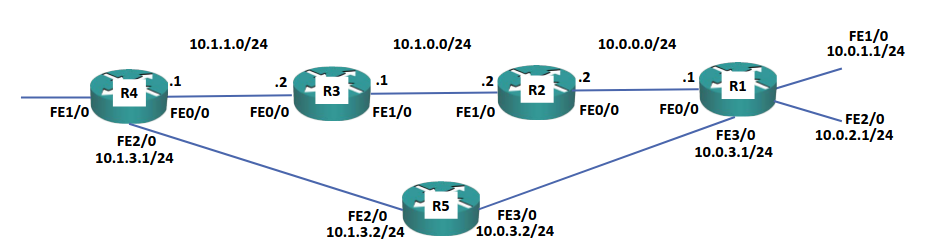 Suppose that the straight line between R4 and R1 is all set to 100 Mbps, and that R5 operates at 10 Mbps. Whereas RIP would choose the path with fewest hops, OSPF will prefer the path with highest bandwidth.
The metric calculation for routes inside an OSPF area is based on looking at all routes available within the area. On the other hand, for routes that traverse area boundaries (via Area Border Routers (ABRs)) the router will choose the lowest cost path to the ABR; at that point, the route selection is handed off to the ABR itself to choose the best path (since ABRs have topology information for all areas they are connected to).
Note
The specific algorithm that OSPF uses is the Shortest Path First algorithm, which simply calculates the overall cost for each available path to the destination. The overall cost == cumulative cost of all outgoing interfaces along the path.
Note
If manually configuring the cost of an interface, ensure that the cost is the same on both ends - else we may have asymmetric routing.
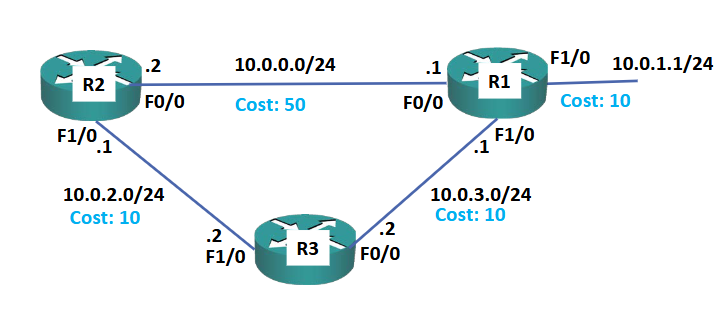
In this example, if data is being transmitted from R2 to a host in the 10.0.1.1/24 network, R2 will calculate the cost as follows:
- Via
F0/0cost = 50 + 10 = 60 - Via
F1/0cost = 10 + 10 + 10 = 30
It aggregates the cost of each interface at every hop, and chooses the lowest overall cost - in this case data will be transmitted via F2/0.
Reference Bandwidth
The cost metric is automatically derived by using the following formula:
COST = {Reference Bandwidth} / {Interface Bandwidth}
By default, Reference Bandwidth is set to 100 Mbps. Thus, a FastEthernet link cost defaults to 1, since FE interfaces have a default bandwidth of 100 (100 / 100 == 1). Likewise, a T1 link would default to 64 (100/1.544).
Warning
OSPF treats all interfaces of 100 Mbps or faster as equal. Thus, on modern networks that use Gigabit Ethernet or greater we can have undesirable routings, since both FE and GE links will have a cost of 1.
When using faster links, ensure the Reference Bandwidth is changed on all routers:
R1(config)# router ospf 1
R1(config-router)#auto-cost reference-bandwidth 100000
Note
OSPF will always prefer the highest bandwidth path, unless told otherwise. If we need to modify the path (say, select a lower bandwidth path due to some constraint) we can either change the bandwidth value or the cost.
In general, it is recommended to use cost for this type of change, since bandwidth can affect other features (such as QoS):
R1(config)# interface FastEthernet 0/0
R1(config-if)#ip ospf cost 50
Why OSPF?
Like EIGRP, OSPF will typically choose the best path by default. However, OSPF is an open standard supported by all vendor’s routers - as a result, it is the most commonly deployed IGPs today.
The downside is that it is more complicated to maintain than EIGRP