When using dynamic routing protocols, routers will automatically advertise their best paths to known networks to each other (using specific Router Metrics and Administrative Distances). Each router can then use this information to determine their own best past to any known destination.
This also allows for constant updating, for example when the network changes by taking a link down or adding a new subnet. Whenever any such change happens, routers will automatically calculate a new best path and update their routing tables.
There are several different Routing Protocol Types available
Basic process
The simplest version of dynamic routing protocols is one where each router in a network advertises its available routes to adjacent routers. Consider the following basic topolgy:
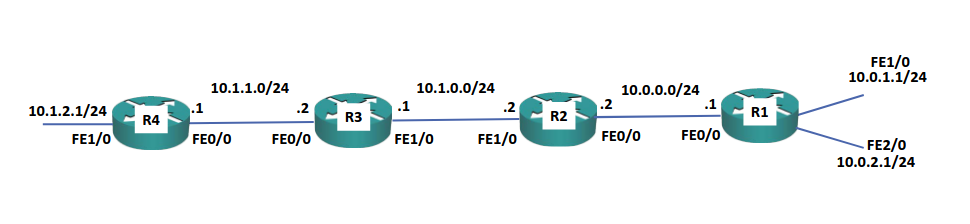
In this scenario, R1 will advertise its Connected Routes to R2. This means that R2 now knows that to get to the 10.0.1.1 and 10.0.2.1 it can use R1 with their common network address (10.0.0.0/24) as a nexthop.
After that, R2 will advertise its own connected routes to R3. However, it will also include data about other network it knows about.
In summary, this means that all the routes everywhere are propagated and advertised everywhere in the network.
Summary Routes
Just like with Static Routes, we can use Route summarization to advertise networks dynamically.
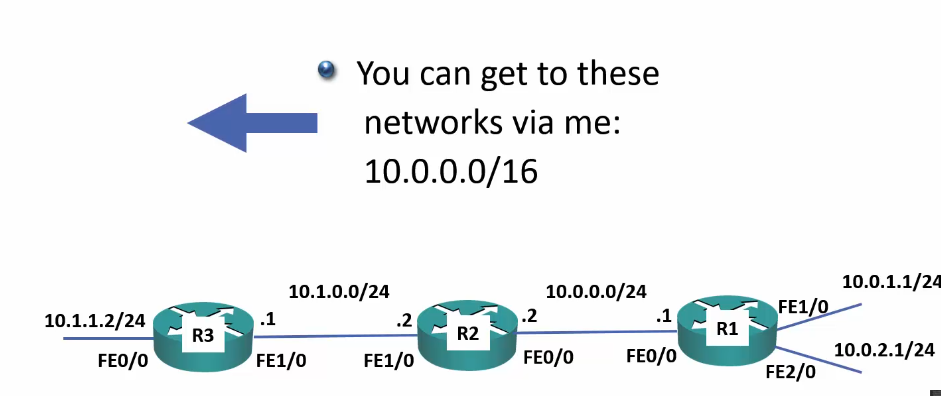
In this scenario, R2 will learn about the 10.0.1.0/24 and 10.0.2.0/24 networks. However, rather than advertise them individually, it can be configured to advertise a summary route of 10.0.0.0/16.
The advantages of using summary routes here are that there will be less memory usage, since the routing tables will be much smaller. Additionally, there will be fewer CPU cycles required since changes in the network will only affect other routers in the same area.
Note
The effect of summary routes and outages:
Image that the link on R1 to the
10.0.1.1/24network goes down. R2 will lose its route there and need to compute a new path; however, R3 had a summary route, not a specific route, so it’s routing table with10.0.0.0/16will remain unchanged.