Loop back interfaces are logical interfaces which allow you to assign an IP Address to a Routers or L3 Switches that is not tied to a physical interface. Because they don’t have Physical Layer attributes, loop back interfaces never go down.
Now, because they are logical only they cannot be physically in the same subnet as other devices, so they are usually assigned a /32 subnet to avoid wasting IP addresses.
Configuration
R1(config)# interface loopback 0
R1(config-int)# ip address 192.168.1.1 255.255.255.255
R1(config-int)# do show run | sec eigrp // to see the network and name of the routing protocol
R1(config-int)#router eigrp 100
R1(config-router)#network 192.168.1.1 0.0.0.0.0 // to add the loopback interface to EIGRP
Often it is best practice to configure loopback interfaces as Passive Interfaces.
Uses
Routers should generally have a loopback interface that is used for traffic that terminates on the router itself - either management traffic, VoIP, BGP peering, etc. They are also used for redundancy if there are multiple paths to the router, and to identify the router (via Router ID) in Open Shortest Path First (OSPF).
Note
It is common to use the same loopback interface for multiple tasks (management and BGP, for instance). It is possible to configure multiple loopback addresses, but this is done only if special use cases are needed.
Example
In the following diagram, the PC at 10.1.2.10 has two paths to connect to router R1:
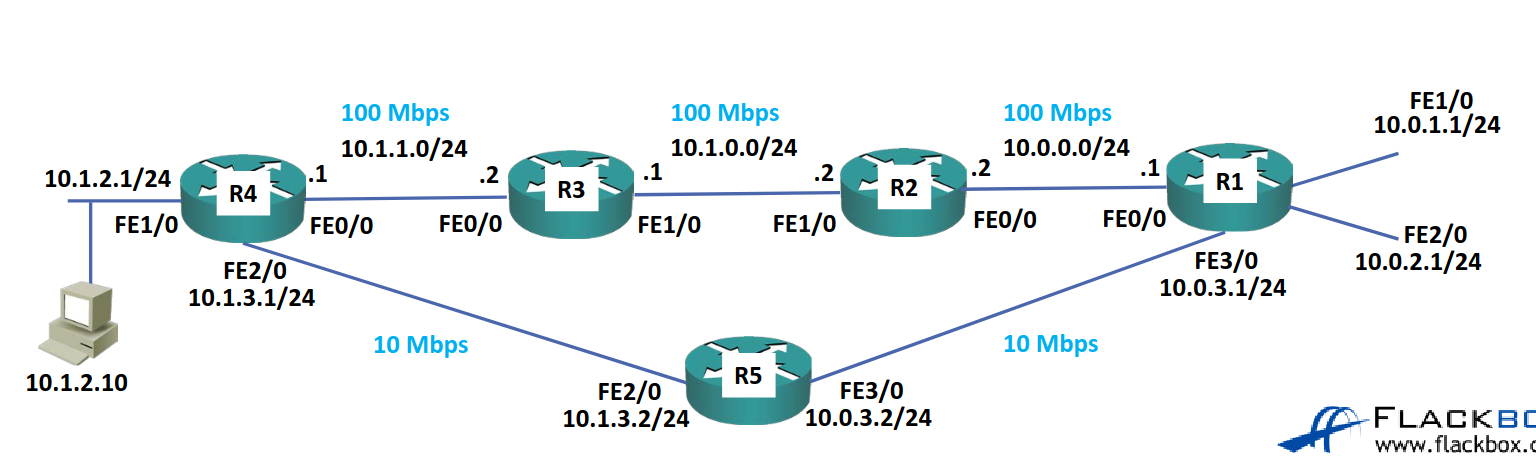
The issue is that if we place a management interface on R1 FE0/0 and that link goes down, we cannot connect to 10.0.0.1 anymor (and likewise for FE3/0).
However, if we add a Loopback 0 interface with an IP address of 192.168.1.1/32 and advertise it as part of the routing procotol then R4 will know of two separate routes to the interface, allowing the PC to connect even if one of the paths goes down.