The Administrative Distance is used to make decisions about Choosing a routing protocol when there are multiple ones present in the network (for example, if both Routing Information Protocol (RIP) and Open Shortest Path First (OSPF) are active). The problem AD solves is that their Router Metrics cannot be compared directly: a RIP hop-count of 5 isn’t comparable to an OSPF cost of 60, for example.
In short, AD is a measure of how trusted a protocol is. Thus, if routes to the same destination are received via different routing protocols, the protocol with the lowest AD will win.
Default Administrative Distances
| Route Source | Default AD |
|---|---|
| Connected Routes | 0 |
| Static Routes | 1 |
| eBGP | 20 |
| EIGRP | 90 |
| OSPF | 110 |
| IS-IS | 115 |
| RIP | 120 |
When using sh ip route we can see the administrative distance values assigned to each route in the Routing Table:
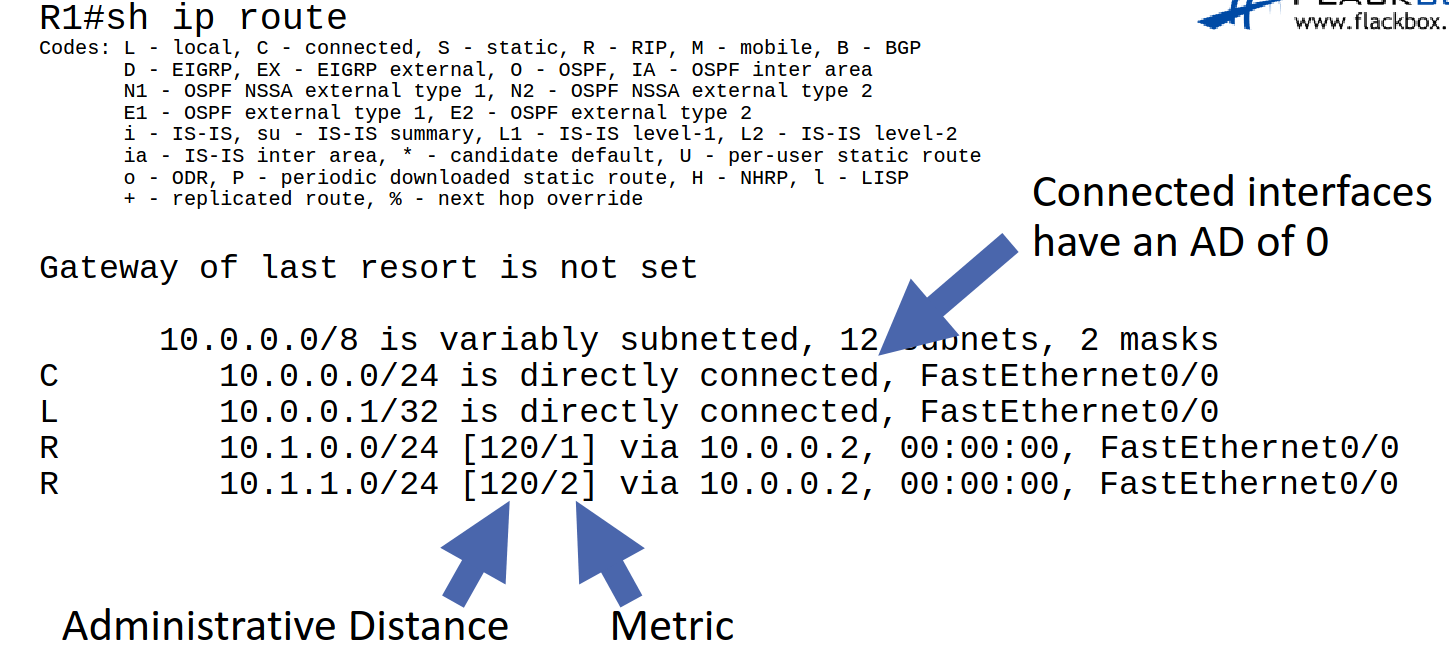
With this information, the process to assign routes to the routing table is as follows:
- Compare the AD from all active routing protocols
- Choose the lowest value
- Discard other protocols
- Compare metrics for each of the routes
- Choose lowest value
- Discard the rest
- Note that if 2 routes have the same metric value, then using load balancing for them
Floating Static Routes
Whenever a link is lost it is removed from the routing tables and replaced with the next best route. Additionally, it is possible to assign Static Routes as a backup - the problem is that they have a Default Administrative Distances of 1, so in theory they are preferred over any protocol-derived route.
The solution is to manually modify the AD of that route to make it as a backup:
R1(config)# ip route 10.0.1.0 255.255.255.0 10.1.3.2 115
The important value here is the last number that includes the administrative distance, and must therefore be set in a reasonable way with regards to the other protocol administrative distances.
Note
We can also use floating static routes to set preferences between them: assign a default static route with an AD of 0, and then add another one with, say, 5. This means the second route will only be used if the first one goes down.
Caution
When adding floating static routes, the router may not realize that the primary route is down is the severed link is downstream of its first hop.