EIGRP is a Cisco proprietary protocol (and thus Cisco labels it as an “advanced” Distance Vector Dynamic routing protocol) designed to support large networks. It has very fast convergence time and supports bounded updates (meaning that network topology changes are only sent to routers affected by the change).
It uses multicast addressing for sending messages. Much like Routing Information Protocol (RIP) it can peform Equal Cost Multi Path (ECMP) load balanced up to 4 paths by default, although this can be increased to 32 paths.
Additionally, EIGRP can be configured to perform unequal cost load balancing.
EIGRP Configuration
Config Example
config t
router eigrp 100
network 10.0.0.0 0.255.255.255
Then to verify connections and set-up:
sh ip eigrp neighbors -- to see immediate neighbors
sh ip route -- to see routing table
sh ip protocols
sh ip eigrp interfaces
Detailed Config
To begin EIGRP configuration we must use router eigrp <as: int> from global config mode.
Note
ASis the Autonomous System number, which defines an independent administrative domain. EIGRP routers must be in the same AS-domain in order to peer with each other. We can have EIGRP enabled routers connected to each other but prevent them for forming IGP adjacencies by assigning them different AS values.
Once we are in the router config mode, we can use commands similar to the Routing Information Protocol (RIP) configuration, except we must include a wildcard mask in the command, i.e. network 10.0.0.0 0.0.255.255.
Note
Wildcard masks are the inverse of subnet masks. To calculate a wildcard mask subtract each octet in the subnet mask from 255. For example, a subnet mask of
255.255.255.252becomes(255-255).(255-255).(255-255).(255-252) == 0.0.0.3. More specifically, a wildcard mask is simply converting all the1s in a subnet mask to0sand vice versa.
Note
If you don’t enter a wildcard mask in the EIGRP config, i.e.
network 10.0.0.0, the command will default to using classfull boundaries, i.e.0.255.255.255for a class A address, etc.
R1(config)# router eigrp 100
R1(config-router)# network 10.0.0.0 0.0.255.255
EIGRP Router ID
With EIGRP routers identify themselves using a unique ID in the form of an IP address. This will default to the highest IP address of any Loopback Interfaces configured on the router, or the highest other IP if not configured.
Note that since loopback interfaces never go down the Router ID will not changed if configured, thus making it best practice to set it up that way. Alternatively, Router IDs can be set manually.
Note
If a loopback or higher IP address is configured after EIGRP has been set up, the Router ID will change on EIGRP process restart
To see the Router ID simply use show ip protocols. To specify the ID use (config-router)#eigrp router-id x.x.x.x
EIGRP Metric - bandwidth and delay
EIGRP uses bandwidth (much like in OSFP) and delay of a specific interface to calculate the cost of a specific path. However, the delay value is fixed and based entirely on what the bandwidth of an interface is - there is not real-time probing or anything like that.
Note
EIGRP can also use load and reliability as a metric, but they are ignored by default.
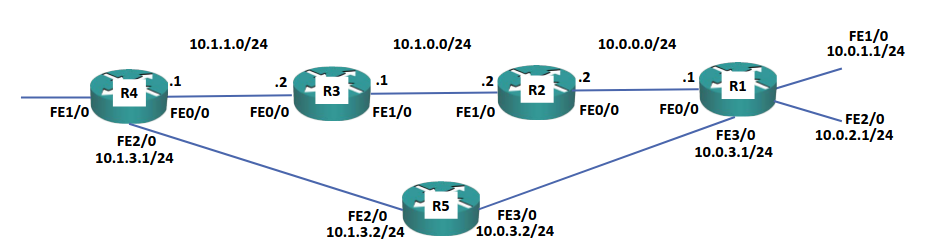
As a result, EIGRP will take the top path by default (assuming 100 Mbps links on top, and 10 Mbps links via R5).
Why EIGRP?
EIGRP is very simple to maintain, calculates changes very quickly, and its metric calculation will generally choose the best path by default.
However, EIGRP is typically only supported on Cisco Devices.