Routers have a Routing Table that describes the subnets the device is directly connected to. This allows traffic to flow between those subnets automatically; however, if the route needs to send traffic to a subnet it does not know about, we can manually add static routes to the destination (or they can be learned via routing protocols).
Consider the example below. the R1 router has three interfaces set up, and via F0/0 it can communicate on the 10.0.0.0/24 subnet (and thus has direct access to R2). However, R1 does not have knowledge of how to send data to the 10.1.0.2/24 network, since that is on the other side of R2:
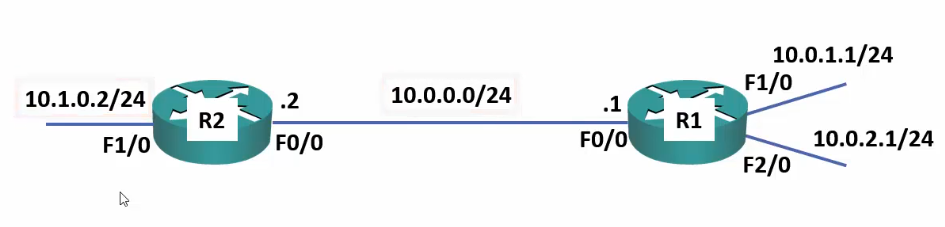
To solve this, an administrator can add static routes to tell R1 how to communicate with the 10.1.0.2/24 network. This is done with the following command:
ip route 10.1.0.0 255.255.255.0 10.0.0.2
The command can be broken down as follows:
ip route <destination network> <destination subnet> <nexthop IP address>
Important
Note that we are deriving the network address from the interface’s specific host address.
Based in the image above, R1 needs to be able to reach the 10.1.0.0/24 network, which is on F1/0 of R2. The network address of R2’s F1/0 interface is 10.1.0.0/24, and R2 has the information required to route traffic to that subnet.
Thus, we begin the command by simply stating what destination network and subnet mask we need.
The final argument is the nexthop IP address. This is simply stating, from the current device, what is the next IP address we need to contact to move our data. In the case of R1, the connection to the 10.1.0.0/24 network is via R2, and to connect to R2 it needs to send data to 10.0.0.2 (R2’s F0/0 IP address on the network it shares with R1).
To complete the setup, we also need to set up static routes from R2 that go via R1:
ip route 10.0.1.0 255.255.255.0 10.0.0.1
ip route 10.0.2.0 255.255.255.0 10.0.0.1
Multiple hops
Consider a scenario where we have several hops between networks, rather than just the one. In that scenario, we apply the same methodology and establish, for each router, the route to the next hop:
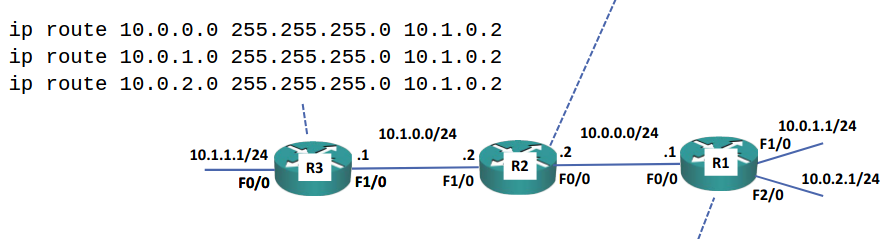 Notice how for R3 we set the destination network and subnet mask as the final destination, but the nexthop address continues to be, literally, the very next hop.
Note
To put it simply, the commands above say “to get to
<network>with<subnet mask>, go viafirst landmark. Our people there will know what to do next.”Perhaps more colloquially, “To get to
<building address>with<postal code>, take this bus. Once you get off someone can help you onwards”.