Layer 3 is responsible for routing packets to their destination and for Quality of Service (as opposed to Transport Layer, which is responsible for specifying port numbers and data reliability).
The IP (internet protocol) is the best known Layer 3 protocol, which functions as a connection-less protocol with no acknowledgement (thus the use of Layer 4 TCP connections, for example). Other Layer 3 protocols include ICMP and IPSec.
IP Addressing
IP addressing is a logical addressing scheme implemented at Layer 3; we use IP addressing to partition networks into smaller “subnets”. This can improve the performance and security of the system - for example, having all servers of one kind in a single subnets means that data won’t be exiting that subnet, and will also allow for easier access control into the subnet.
IP addresses differ from MAC addresses because:
- IP are Layer 2, MAC are layer 2
- IP uses logical addressing, MAC uses one big flat scheme (and thus no separation is possible)
The IP Header
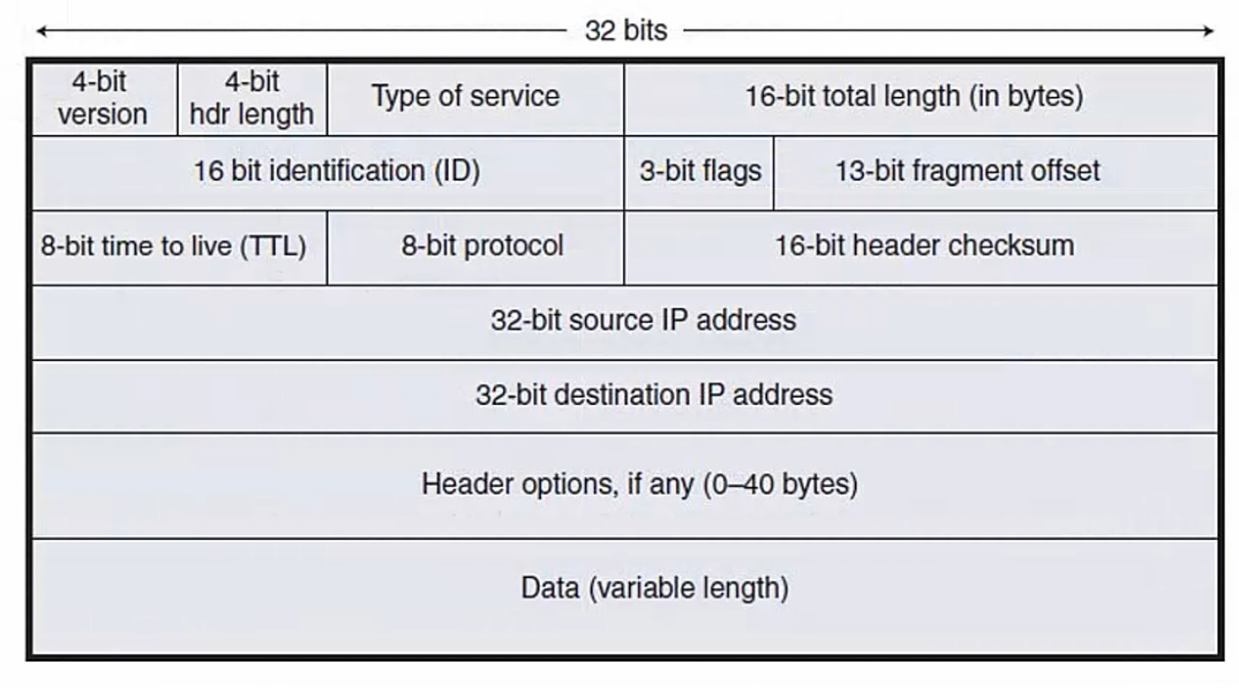
| Header data | Description |
|---|---|
| 4-bit version | IPv4 vs IPv6 |
| 4-bit hdr length | Describes the length of the header for some optional info |
| Type of Service | Used for QoS information |
| 16-bit total length | Total length of packet in bytes |
| 16-bit ID | Used for fragment info. |
The 8-bit TTL is a counter that gets -=1 every time it goes through a router. If the TTL == 0, then the packet is dropped in order to avoid routing loops.
The 8-bit protocol defines the Layer 4 protocol.
Note
The 32-bit destination IP address can also be a FQDN, which gets resolved into IP address via DNS
Unicast, Multicast, and Broadcast
IP traffic has three primary types: unicast, multicast, broadcast:
| Traffic type | Destination(s) |
|---|---|
| Unicast | Single destination host |
| Multicast | Multiple interested hosts |
| Broadcast | All hosts on subnet |
Unicast
Here traffic simply goes from a sender to a single host. Note that we can also have unicast traffic to multiple hosts: it will send separate copies of the same data to multiple hosts.
In other words, this is separate transmissions of the same data - assuming each packet is 1 MB, we would require 3 MB to send the same data to three separate hosts.
Broadcast
The sender sends one message to a switch. The message then gets flooded to all other hosts in the same subnet (meaning it will not go past routers - they do not forward broadcasts, since routers would forward all traffic from the internet, for example).
Multicast
This sends a single copy of data that gets sent to multiple hosts. This is different from unicast to various hosts because the sender does not need to create multiple transmissions.
Note that multicast does traverse subnets. Multicast requires that the receiving hosts request the data.
Decimal to Binary
When adding a column to the left in binary, the value is always multiplied by 2. Thus the number we are trying to convert to binary would have to be fit in a table such as:
| 32 | 16 | 8 | 4 | 2 | 1 |
|---|---|---|---|---|---|
| Thus for example, if we want to convert the number 236 into binary we fill out a table that begins with the first column value higher than our conversion number (so in this case, our binary table starts at 256). We then see our numbers fits in the table, subtract the column value and move over (the numbers in brackets are the result of subtracting the column value from the number): |
| 256 | 128 | 64 | 32 | 16 | 8 | 4 | 2 | 1 |
|---|---|---|---|---|---|---|---|---|
| 0(236) | 1(108) | 1(44) | 1(12) | 0(12) | 1(4) | 1(0) | 0 | 0 |
| Thus 236 in binary is 011101100. |
Note that when doing this conversion there should always be 0 left over after the last bit is assigned. We can also add up all the column values where we have a 1 and it should add up to our original number: 128+64+32+8+4 = 236.
IPv4 Addresses
An IPv4 address is 32 bits long written as 4 octets in decimal format where each octet is 8 bits long. When written in decimal, each of the octets has a value between 0 and 255 (or a total of 256 values).
Note
To show IP addresses on IOS we can use the
show ip interface briefcommand from an enable prompt.
To convert an IPv4 address to binary simply apply the Decimal to Binary process to each octet. For example, 192.168.10.15 converts to 11000000.10101000.00001010.00001111
IP Address Classes
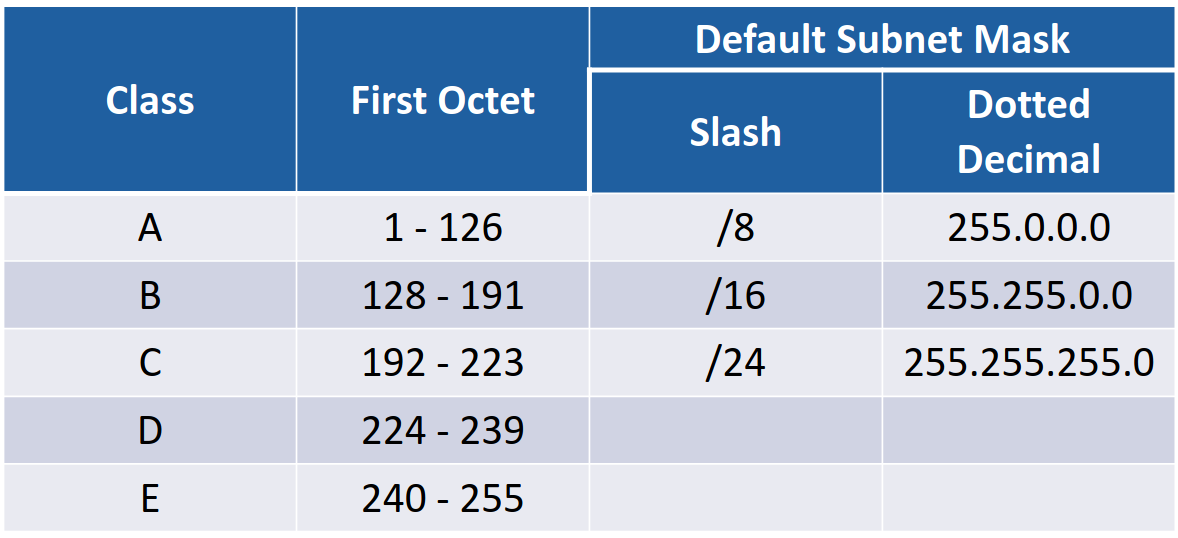
When looking at the host portion of a network, the bigger the Subnet masks (that is, the more bits of the address it occupies), the fewer amount of hosts we can have. For example:
- Subnet mask =
/8, we have 24 bits available for hosts- Subnet mask =
/24, we have 8 bits available for hosts
Note
The IP addresses in the IP class scheme include various ranges, but there are also reserved Private Addresses in each class. Private addresses are valid for host assignment, but not routable on public internet (and thus should have no internet access). Private ranges are the following:
- Class A:
10.0.0.0to10.255.255.255- Class B:
172 .16.0.0to172.31.255.255- Class C:
192.168.0.0to192.168.255.255Class A
Network addresses always start with
0, and default subnet mask is/8(first octet). Valid network addresses from1.0.0.0to126.0.0.0/8These IP addresses are assigned to networks with very large numbers of hosts. To accomplish this, the higher order bit (that is, the first bit in the address) is always set to
0, with a default subnet mask of/8.Because the high order bit is set to
0, the highest value that can be set in the first IPv4 octet is127(that is,64 + 32 + 16 + 8 + 4 + 2 + 1). However,127.0.0.0is a reserved address, and thus the highest network address available is126.0.0.0.What this means is that we can have up to 126 networks and up to 16,777,214 hosts per network, since the host addresses range from
1.0.0.1to126.255.255.254(note that126.255.255.255is the broadcast address for that network).Reserved Class A Addresses
0.0.0.0/8signifies “this network”
- Thus,
0.0.0.1to0.255.255.255are not valid host addresses- This also means that there are 16 million valid addresses that could be used to signify “this network”
127.0.0.0/8is reserved as the loopback address for testing local computer
- Thus,
127.0.0.1to127.255.255.255are not valid host addresses either- Note that the “loopback” address therefore contains 16 million valid network addresses
Class B
Network addresses always start with
10and the default subnet mask is/16(second octet). Valid network addresses from128.0.0.0to191.255.0.0/16.Class B addresses were originally assigned to medium/large networks. This allows for 16,384 networks and 65,534 hosts per network.
Class C
Network addresses always start with
110and default subnet mask is/24(third octet). Valid network addresses from192.0.0.0to223.255.255.0/24.Class C addresses were originally assigned to small networks. This allows for 2,097,152 networks and 254 hosts per networks.
This is a reasonable size that could be allocated for a real world network, or subnetted into smaller subnets.
Class D
Class D addresses are reserved for IP multicast addresses. Their high-order bits always start with
1110and thus compose addresses from224.0.0.0to239.255.255.255. These are not allocated to hosts and have no default subnet mask.Note
The range of
224to239is derived entirely from the first octet.224=11100011while239=11101111(the zero is required because Class D addresses always start with1110)The way multicast works is that the sender will still send out a package with a SRC and DST header (as it does in unicast, normal traffic). However, the destination header will be set to an IP address in the multicast range (for example,
239.0.0.1). This will then be repeated by the switch and received by hosts that are “interested” in the data.This is a lot like tuning into a radio station. The interesting destination hosts run an application that defines an interest in data from the
239.0.0.1address, so they subscribe (note that this would have to be configured in the routers). This is useful to save on bandwidth.Class E
Class E addresses are “experimental and reserved for future use”. They have high-order bits set to
1111, and have neither hosts nor default subnets. They range from240.0.0.0to255.255.255.255(although the4x255address is the broadcast address for this network, and is the only pre-defined ).Link to originalNote
255.255.255.255is the broadcast address for this network. Meaning that whatever network the host is on, messaging 4x255 will broadcast the message.