Switches
Whereas routers decide the destination of a packet based on the IP on that packet, a switch will decide connections based on MAC addresses. They are very good at very rapidly moving data, since alln the bridging is done in hardware, sometimes even with ASICs (Application Specific integrated circuit).
They can operate either in full-duplex or half-duplex mode, although in practice they always operate in full-duplex. This means that hosts can send and receive data at the same time, since each hosts has its own dedicated collision domain (and thus CD is not required).
Switches may also have Power over Ethernet. If the switch can also have routing functionality, it is known as a multilayer switch.
Because switches operate at Layer 2 of the OSI model are are MAC address aware and thus have the ability to forward packets to the MAC address in The Ethernet Header. When it does that, a switch will add the MAC address to its own MAC address table, which maps MAC addresses to specific ethernet ports.
Switches typically only support Ethernet interfaces.
Important
Note
The only times when a switch will flood all ports are 1) when a frame is received for the broadcast address or when the Unicast destination is not known yet.
Unmanaged switch
These have few options, they have no config options, but they are plug and play. They have no management protocols, and essentially all devices plugged in will be on the same VLAN.
They are, however, low cost
Managed switch
Managed switches have VLAN support - allowing different IP subnets on different ports. Additionally, they may have traffic prioritization to give more priority to certain kinds of traffic (VoIP, for example).
If a network has multiple switches connected in the network as redundancy, we have prevent loops between them by using STP (Spanning Tree Protocol).
They can also use Port Mirroring, which can take all the data arriving through a particular port and mirror it on a different one, often used to capture packets and analyse them with some sort of tool.
They also generally allow for external management via some protocol, such as SNMP.
Access Point
Access points are not wireless routers - those are routers and accesspoints in a single device. An AP, also known as a bridge, is simply used to extend the wired network into a wireless network.
It makes forwarding decisions based on MAC address (exactly like a switch).
Cable infrastructure
Patch panels are used to centralize all cabling prior to delivery into network infrastructure. The cable runs from stations to patch panel will generally be permanent, and from the patch panel on they can be configured as necessary.
Firewalls
Firewalls filter traffic by port number as part of OSI Later 4 (TCP/UDP) - therefore known as “layer 4 devices” - although some firewalls can filter based on the application - making “layer 7 devices”.
Firewalls may also work as encrypted endpoints to encrypt and decrypt traffic in/out of the network. Additionally, they may proxy traffic.
Sometimes they can also function as routers (making them layer 3 devices), usually sitting at the ingress/egress edge of the network.
PoE
Some devices allow power delivery over ethernet. This is often used for access points, cameras, etc.
If the power is provided at the switch we refer to that as an endspan. PoE injectors, if required, are referred to as midspans.
PoE standards
There are different PoE standards and delivery methods.
PoE
The original PoE specification is IEEE 802.3af-2003, which has now been moved into part of the 802.3 Ethernet standard. This specifies delivery of 15.4 watts DC at 350 mA max current.
PoE+
PoE+ is the next iteration of the standard, defined at IEEE 802.3at-2009, although it also now part of the 802.3 standard.
25.5 watts DC power, 600 mA max current
PoE++
Defined in IEEE 802.3bt-2018.
It comes it two types: Type 3: 51 watts, 600 mA current Type 4: 71.3 watts, 960 mA max current
It is designed to work with 10 gigabit/s networks, and to provide power to those devices.
Hub
Hubs are also known as multi-port repeaters, where traffic going into one port is repeated out of every other port. Makes everything half-duplex and becomes less and less efficient with more devices connected, and only support 10/100 megabit transfer. Thus, they are not common.
Importantly, attached hosts cannot TX and RX at the same time; additionally, only one device can transmit at a time. Should two hosts send at the same time a collision will occur. To manage this, hosts must use Carrier-Sense Multiple Access with Collision Detection (CSMA/CD) to detect collisions and resend.
They operate at Layer 1 of the OSI Model. As a result, they are not MAC Address aware (thus they flood data to every port apart from the one where it was RX’d). Every host attached to a hub must process all packets.
Important
Cable modem
Cable modems allow for “broadband” communication, meaning that a single wire is transmitting multiple types of data.
The standard for the “cable” network is DOCSIS, or Data Over Cable Service Interface Specification.
These modems support high-speed networking with availability of up to 1 gigabit/s.
DSL Modem
If a cable modem is not available, a DSL/ADSL modem (Asymmetric Digital Subscriber Line) modem may be in place, which uses telephone lines for data transfer.
The asymmetry is because download speeds are faster than upload speeds.
These modems have limitations regarding distance of about 10k ft before signal attenuation makes it unusable.
Optical network terminal
If the internet connection is not made via telephone or copper lines, then the connection might be via fibre optical cables. These machines use an ONT to convert ISP fiber cables into copper/ethernet cables.
The ONT is usually a terminal box outside the building, and demarcates the boundary between the ISP and the local network. This demarc point is important, because inside the ONT boundary we are responsible for the network, while events outside of that point are the ISP’s responsibility.
Network Interface Cards
Connecting to copper ethernet connections requires NICs, which are the fundamental network device. Every machine on the network must have a NIC.
There are NICs that are specific to the type of network they join - ethernet, WAN, wireless, etc. Sometimes they are built-in or they are addons.
Software Defined Networking
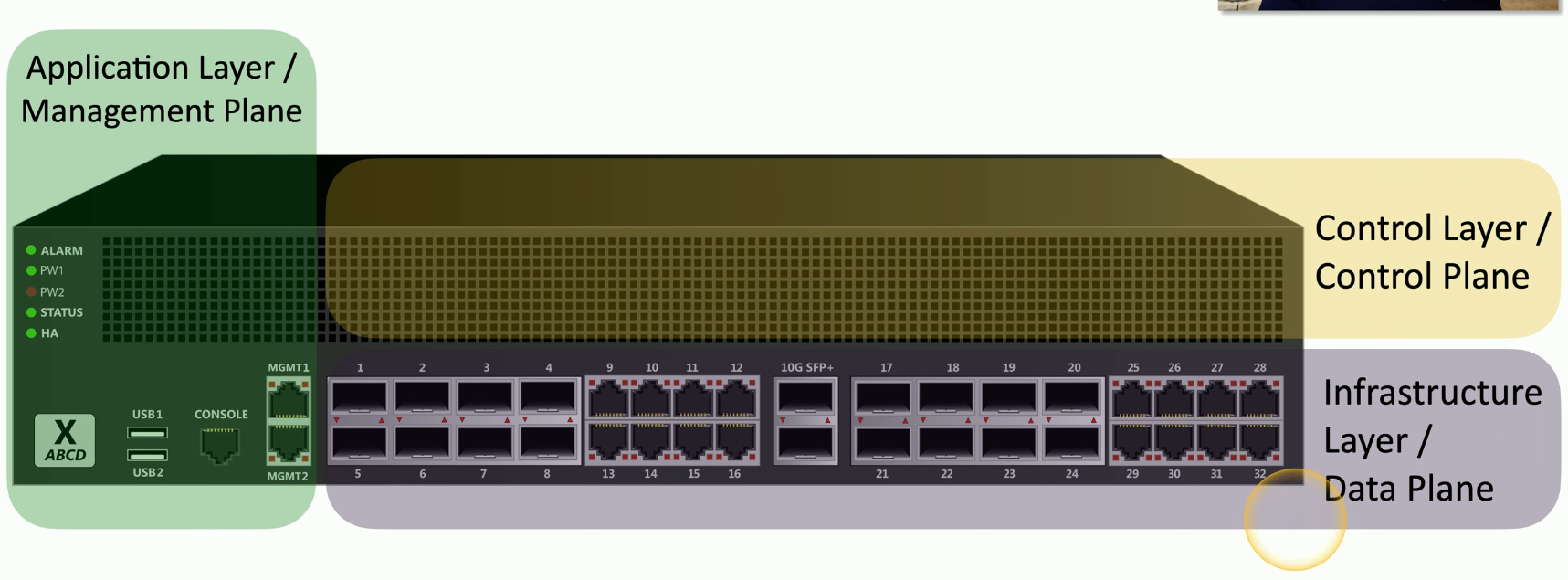
In cloud servers we don’t have direct access to physical switches, routers, etc. As we move into cloud services, we can maintain and define topologies using SDN. For example, we can take a switch and split each of its functions into individual pieces and have each piece run independently in the cloud - thus allowing for the creation of data, control, and management planes.
There are three common ways to separate these devices to manage our components:
- Infrastructure/Data plane layer
- This layer does all forwarding, trunking, encrypting, NAT, or anything else that must happen at the packet level
- Control layer/plane
- The control plane manages the actions of the data plane
- May include routing tables, session tables, NAT tables
- Dynamic protocol updates
- Application later / Management plane
- This is where we interact to configure and manage the device
- Often done via SSH, browser, or API