Mode Control Panel
Primary panel control for autoflight system.
It can be broken down into four sections:
- Speed control
- Lateral navigation
- Vertical navigation
- Engagement/disengagement switches.
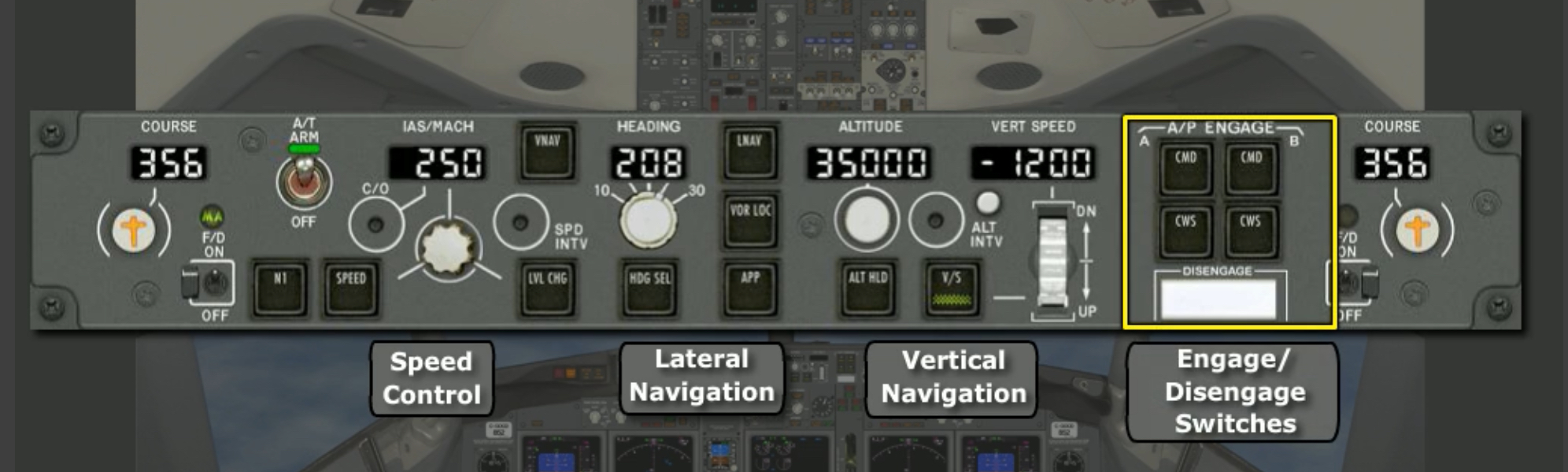
Speed controls are primarily used to command the auto throttles when the system is armed. Should an 8 flash in the speed selection display, the commanded speed is greater than an over-speed limit; if the speed commanded is less than minimum speed, a flashing A will appear.
Under certain conditions, autopilot modes cannot be deselected. On the MCP, an illuminated mode light indicates that the mode can be deselected; once the light is out (with the mode active as shown on the FMA), the mode can only be disengaged under certain conditions. For example, APP mode can only be disengaged by:
- Pushing a GA switch
- Disengaging the autopilot and turning off both flight directors
- Selecting a different VHF NAV frequency
This type of logic also applies when trying to select modes that conflict with current autoflight mode.
What does a flashing 8 and A mean on the MCP Speed display?::8 means commanded speed is > an over-speed limit; A means < minimum speed.