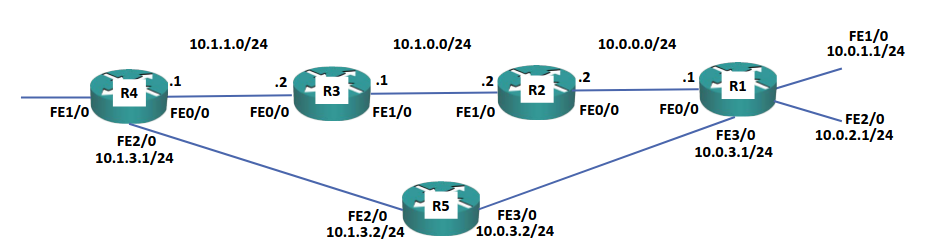
Connected and Local Routes
Connected and local routes are the first type of route that will be available on a router. The best available path(s) to a destination network are listed in a router’s routing table and will be used for forwarding traffic. The table consists of directly connected networks and routes, which can be configured statically by an administrator or learned dynamically via routing protocols.
Note
The router may learn of many different routes, but it is designed to always pick the best one.
Connected Routes
(Connected interface)
Connected routes show the directly connected IP subnet assigned to that interface.
The first step to build a routing table and allow routing functionality on the device is to configure IP addresses on the router’s interfaces. Doing so will automatically enter connected routes into the routing table. For example, if we configure the following interfaces on a router:
interface FastEthernet0/0
ip address 10.0.0.1 255.255.255.0

interface FastEthernet1/0
ip address 10.0.1.1 255.255.255.0

interface FastEthernet2/0
ip address 10.0.2.1 255.255.255.0
We will then have the following routing table:
R1#sh ip route
C    10.0.0.0/24 is directly connected, FastEthernet0/0
C    10.0.1.0/24 is directly connected, FastEthernet1/0
C    10.0.2.0/24 is directly connected, FastEthernet2/0
This allows the router to take any traffic destined for a specific network that arrives on a different interface to be routed appropriately. For example, if traffic for the
10.0.0.0/24network is received onFastEthernet2/0(FE2/0has an IP of10.0.2.0/24) the router can use the routing table to forward the traffic out via the appropriate interface (FA0/0in this case).Note
The routing table shows us connected routes; note that it does not show us the host IP address of that specific interface. To see that, we need Local Routes.
Local Routes
Local routes show the IP address assigned to that interface
Local routes are displayed from IOS 15 or higher. These routes always have a
/32mask and show the IP address configured on the interface (rather than the network address of that interface):Link to originalR1#sh ip route L 10.0.0.1/32 is directly connected, FastEthernet0/0 L 10.0.1.1/32 is directly connected, FastEthernet1/0 L 10.0.2.1/32 is directly connected, FastEthernet2/0
Default Route
In addition to the Static Routes configured in the Routing Table, we can also configure a default route or gateway of last resort. This is used to define where packets should go to if we haven’t defined any other route for them.
Suppose R1 has another interface,
F1/0with an IP address of203.0.113.1and is connected to the internet at large via that interface. We can use the following command to set this up as the default route:ip route 0.0.0.0 0.0.0.0 203.0.113.1This then becomes a catch all for any traffic sent to any route that isn’t otherwise defined in the routing table. This works because any other route configured in the routing table will be more specific.
Link to original