TCP and UDP
Both the TCP and UDP protocols are encapsulated inside the IP protocol, and are both common ways to move data.
They are also referred to as the transport layer, or as level 4 (of the OSI model).
Some of the capability that TCP and UDP provide is the ability for multiplexing, that is, having different applications at the same time.
Transmission Control Protocol
TCP is a connection oriented protocol because there is a formal process to begin and to end the connection. It also has “reliable” delivery, meaning it can recover from errors and manage out-of-order messages or re-transmissions.
Additionally, TCP incorporates flow control capability so that one side of a conversation, such as a server, can request a slow-down in data transmission.
TCP also carries out sequencing to ensure that data segments are processed in the correct order and that none are missing. It does this simply by looking at the sequence number in the TCP payload to ensure the final ordering is correct and not missing any parts.
The Three way Handshake
When a TCP connection is being established computers will implement a 3-way handshake.
- The sender will send a
syn(or synchronize) message to the destination host. - When received, the destination host will send back a
syn-ackmessage to the source - Finally, the original sender will send
ack
User Datagram Protocol
UDP is a connectionless oriented flow (or best effort traffic), wherein there is no formal open or close to the communication being sent. This implies that there is no acknowledgement from the receiving end of the data, and therefore cannot handle error recovery, data reordering, or re-transmissions.
In other words, we cannot tell that the data was received on the other side. There is no sequencing, no handshake, no acknowledgements, etc.
Note
It is possible to have error detection when using UDP, but this has to be implemented in the upper layers of the OSI.
Payloads
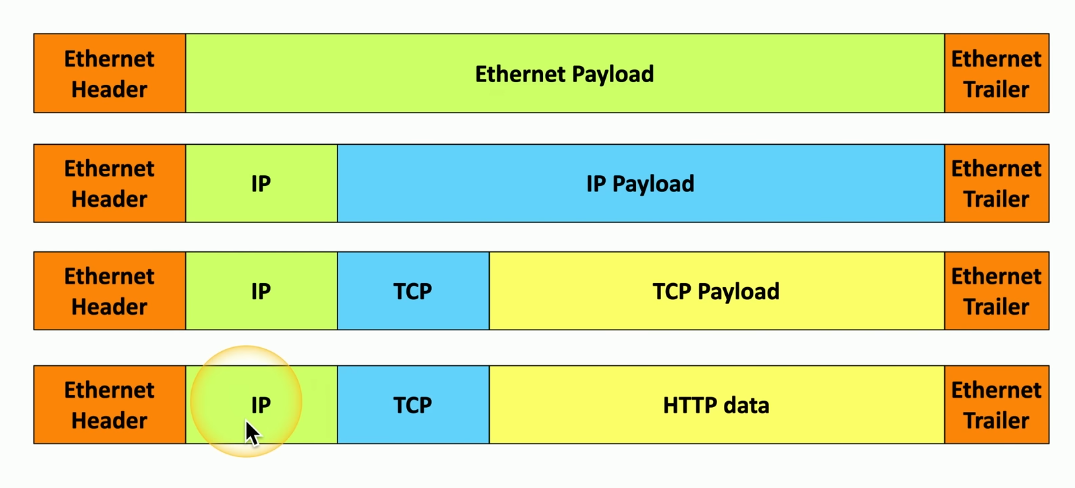
All the data travelling across an ethernet network is called a frame, which consists of an “ethernet header”, an “ethernet payload”, and an “ethernet trailer”.
The payload can have anything in it, but will often have an “IP header” and an “IP payload”. The IP payload itself might have data inside of it, which could include a “The TCP Header” and “TCP payload” or other such data, such as HTTP data.
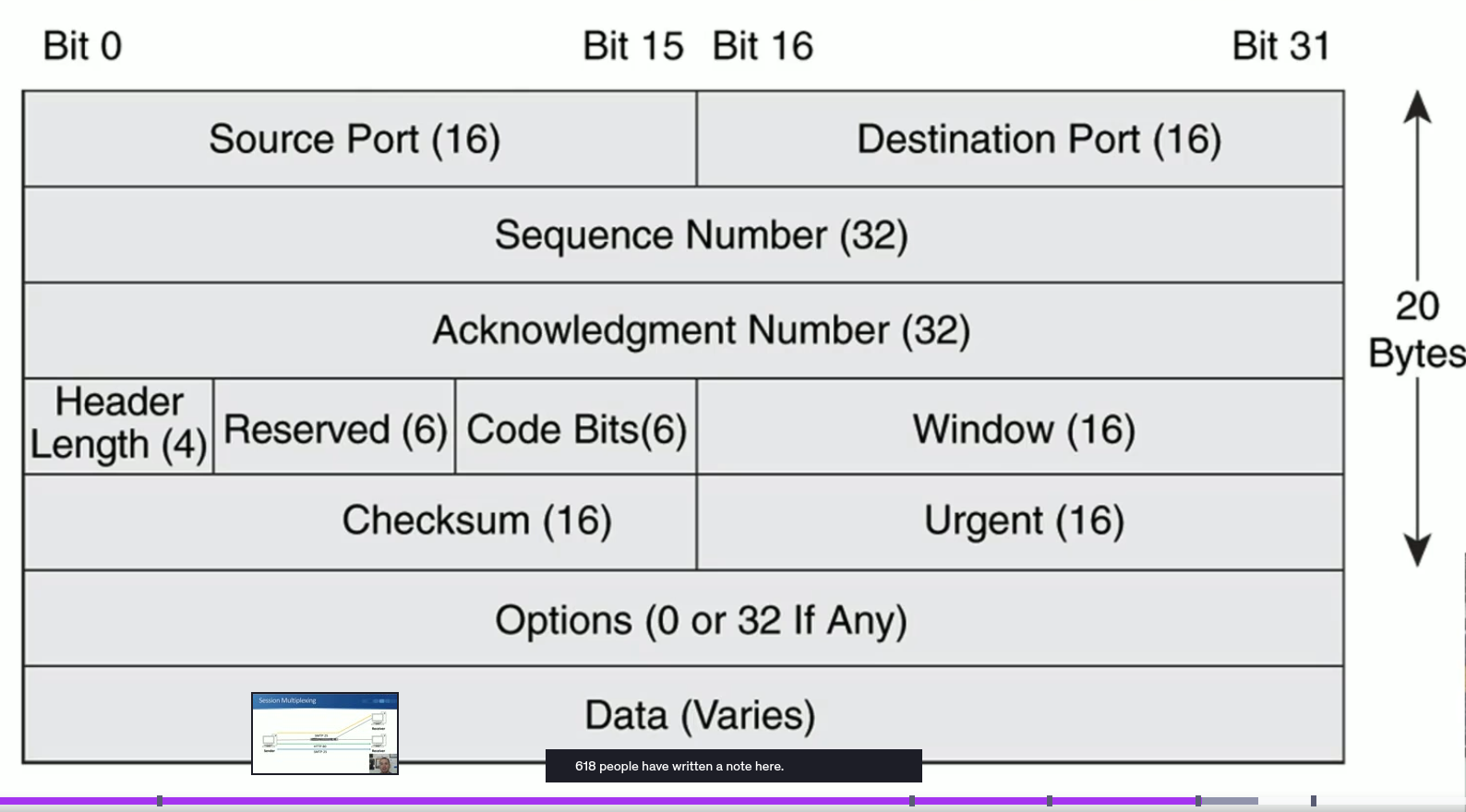
The TCP Header
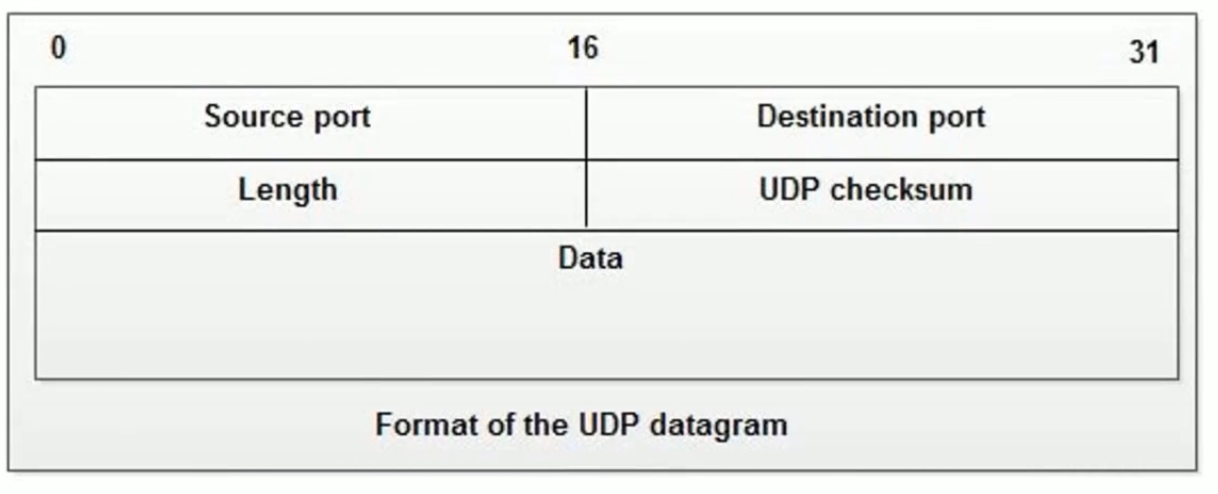
The UDP Header
Use cases
Although TCP has more error handling capability, UDP is more often use to ensure real-time communication, since the programs do not stop to consider your network state. Note that the decision to use one or the other is up to the application developer.
For example, in a phone call there is no way to catch an error and re-do a transmission: it is best to simply send the data and hope for the best. This is also the case for online multiplayer games, for example.
Some examples of UDP programs:
- DHCP (Dynamic Host Configuration Protocol)
- TFTP (Trivial File Transfer Protocol)
The implication of UDP is that the application sending the data must keep track of where data has been sent, and what to do after sending is complete.
Some examples of TCP programs:
- HTTPS
- SSH
In these, the sending gets an acknowledgement that the data was sent.
Note
There are some applications that can use both TCP and UDP, such as DNS (53)
Note
The port number is protocol specific. That is to say, we can have an application using tcp/53 and udp/53 at the same time. The port pools for each protocol are completely independent.
Speedy Delivery
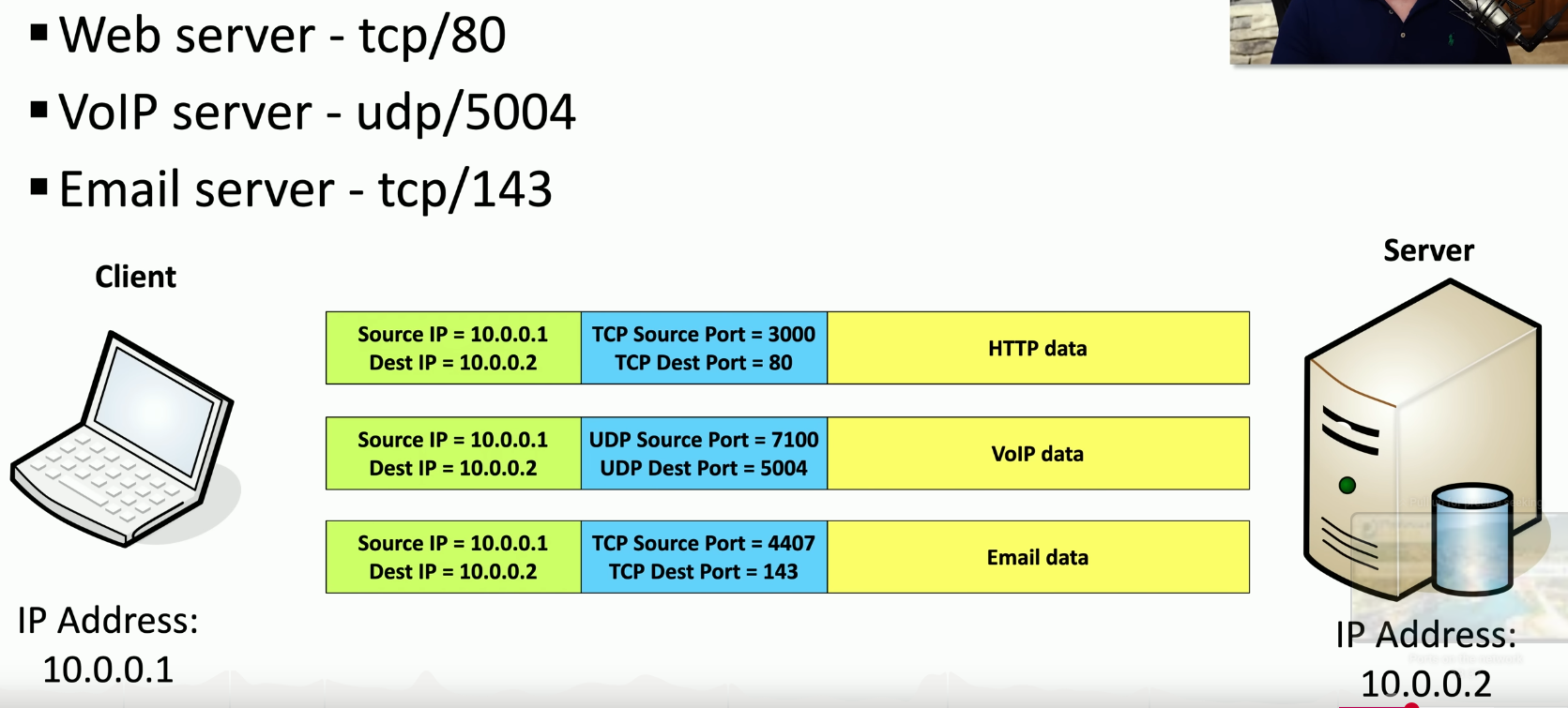
Every computer in a network has an IP address. However, to figure out where on the server a particular piece of data must go to, port numbers are included as part of the IP protocol.
To manage all the traffic heading to various IP:Port combinations, we make use of IPv4 sockets, which include the following information:
- IP address
- Protocol
- Port number
This information must be present for both client and server, since TCP is a two-way communication method.
Note that ports are for communication, not security.
Note that TCP port numbers != UDP port numbers. In other words, we can have something on TCP:80 at the same time as UDP:80, although it is not common.
Common network ports
Well-known port numbers are useful for clients and servers to match easily, as well as for firewall rules.
| Port number | Protocol | Usage | Notes | |
|---|---|---|---|---|
| tcp/20 (control) tcp/21 (active mode) | FTP | file transfers | Auth with password/username, though anonymous login may be allowed | |
| tcp/22 | SSH | Remove login | SSH sends all encrypted data | |
| tcp/23 | Telnet | Remove console | Not encrypted | |
| tcp/25 | SMTP | Mail transfer | Used for server to server email transfer, and to send mail from device to mail server | |
| udp/53 | DNS | Name resolution | ||
| udp/67 udp/68 | DHCP | IP configuration | ||
| tcp/80 | HTTP | |||
| tcp/443 | HTTPS | |||
| tcp/110 | POP3 | Basic mail transfer | Post Office Protocol v3. USed to get emails from server, but not designed for multiple accounts | |
| tcp/143 | IMAP4 | Mail transfers | Internet Message Access Protocol v4. Can manage email inbox from multiple clients | |
| udp/137 (NetBIOS name services (nbname)) tcp/139 (NetBIOS session service(nbsession)) | SMB/CIFS | file transfers | Server Message Block (also known as Common Internet File System), used by Windows Older systems use NetBIOS over TCP/IP (Network Basic Input/Output System) udp/137 is used to find the service by name, while tcp/139 is used to set up sessions and manage file transfers | |
| tcp/445 | SMB/CIFS | file transfers | Newer version of SMB that uses TCP-direct without NetBIOS | |
| udp/161 (queries) udp/162 (traps) | SNMP | Network device statistics | Simple Network Management Protocol, used to get server data. Queries are made on udp/161, while configured threshold alerts are sent on upd/162 Comes in three versions: v1: structured tables, clear-text v2: data types, bulk transfers, clear-text v3: message integrity, encryption, authentication | ! |
| tcp/389 | LDAP | Lightweight Directory Access Protocol | Protocol to access directories. MS Active Directory is the most common version | |
| tcp/3389 | RDP | Remote Desktop Protocol | Standard used by Windows. Can be used to connect to an entire desktop or just an application | ! |
Flashcards
tcp/20:::FTP control tcp/21:::FTP active mode tcp/22:::SSH tcp/23:::Telnet tcp/25:::SMTP udp/53:::DNS udp/67:::DHCP udp/68:::DHCP udp/67 + udp/68:::DHCP tcp/80:::HTTP tcp/443:::HTTPS tcp/110:::POP3 tcp/143:::IMAP4 udp/137:::NetBIOS name discovery (nbname) tcp/139:::NetBIOS session and file transfer tcp/445:::SMB (new SMB versions that don’t use NetBIOS) udp/161:::SNMP queries udp/162:::SNMP traps tcp/389:::LDAP tcp/3389:::RDP
Auth with password/username, though anonymous login may be allowed ?? File Transfer Protocol → tcp/20 + tcp/21
Remote encrypted login ?? Secure Shell → tcp/22
Remote (un-encrypted) login ?? Telnet → tcp/23
Used for server to server email transfer, and to send mail from device to mail server ?? Simple Mail Transfer Protocol → tcp/25
Name resolution ?? Domain Name Resolution → udp/53 || tcp/53
Assign IP addresses to machines in network ?? Dynamic Host Configuration Protocol → udp/67 + udp/68
Used to get emails from server, but not designed for multiple accounts ?? Post Office Protocol v3 → tcp/110
Can manage email inbox from multiple clients ?? Internet Message Access Protocol v4 → tcp/143
nbname service to find servers by name prior to data transfer ?? NetBIOS → udp/137
Used by older SMB versions for data transfer sessions (nbsession) ?? NetBIOS → tcp/139
TCP-direct file transfers, commonly found on Windows ?? Server Message Block → tcp/445
Protocol manager design to query systems, usually used for network management ?? Simple Network Management Protocol → udp/161
Protocol agent design to for network management, designed to send alerts ?? Simple Network Management Protocol → udp/162
Protocol to access directories. MS Active Directory is the most common version ?? Lightweight Directory Access Protocol → tcp/389
Standard used by Windows. Can be used to connect to an entire desktop or just an application remotely ?? Remote Desktop Procotol → tcp/3389