Router setup
A Routers provides connectivity between different IP subnets. For this to work, an IP address must be configured on the interfaces for each subnet.
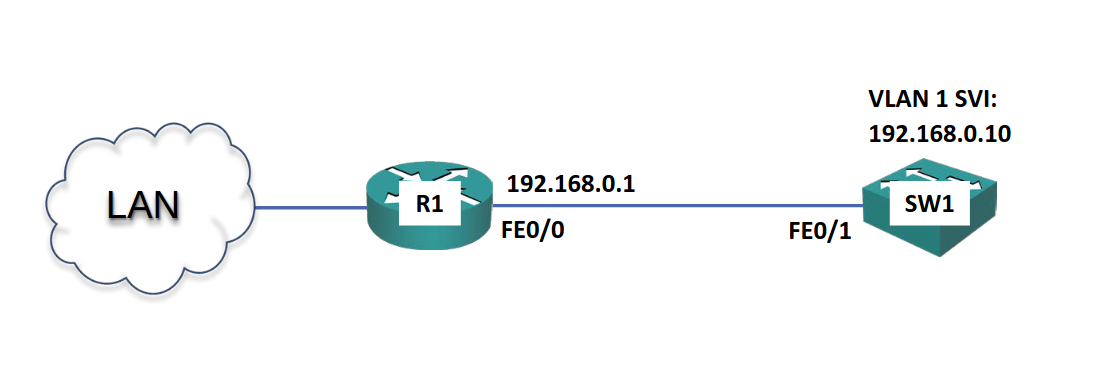
To set up and configure an interface, first we must go to that interface:
R1> enable
R1# configure terminal
R1(config)# interface FastEthernet 0/0
R1(config-if)#
Once at the interface configuration prompt, we can do the following to set up the IP address and bring up the interface:
interface FastEthernet0/0
ip address 192.168.0.1 255.255.255.0
no shutdown
description Link to SW1

...

interface FastEthernet0/1
ip address 192.168.1.1 255.255.255.0
no shutdown
Note
On IOS interfaces are shut down by default. Thus the need to include the
no shutdowncommand.
With this set up, the router is able to move traffic between the two subnets. Additionally, this also means the router itself has IP connectivity (thus giving us the ability to connect via SSH or Telnet).
Switch setup
Layer 2 switches are no IP routing aware; nonetheless, they support having a single IP address for management (via SSH or Telnet). This is configured on the Switched Virtual Interface (SVI) for the default VLAN1. Additionally, a default gateway must also be configured to allow connectivity to other subnets.
Note
VLAN1 is the default VLAN, and all Layer 2 switch ports on a switch are on VLAN1 by default. The equivalent in other manufacturers may be “management port”.
Switch(config)# interface vlan 1
Switch(config-if)# ip address 192.168.0.10 255.255.255.0
Switch(config-if)# no shutdown
Switch(config-if)# exit
Switch(config)# ip default-gateway 192.168.0.1
Switch(config)# hostname SW1
The default-gateway configuration is necessary only if we want traffic moved through this switch to have the ability to connect with other subnets.
Trivia
On routers interfaces are shutdown by default, on switches they are up by default. However, we can simply get into the practice of always saying
no shutdownwhen configuring an interface.
We can also add descriptions to the interfaces in order to help with troubleshooting and management:
SW1(config)# interface fastEthernet 0/1
SW1(config-ip)# description Link to R1
To allow Telnet or SSH access: !!!