In Python, lists do not contain any objects themselves; rather, they contain references to objects. As a result, the same object can appear multiple times within a list, or outside that list.
For example, now that the list contains the milk object twice, simply by having two references to it, rather than storing two copies of it.
```python
class Product:
    def __init__(self, name: str, unit: str):
        self.name = name
        self.unit = unit


if __name__ == "__main__":
    shopping_list = []
    milk = Product("Milk", "litre")

    shopping_list.append(milk)
    shopping_list.append(milk)
    shopping_list.append(Product("Cucumber", "piece"))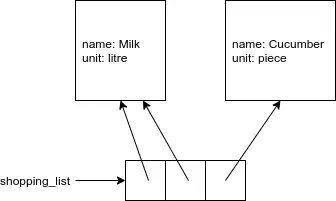
A more complex examples is the following (see a visualization)
class Dog:
    def __init__(self, name):
        self.name = name

    def __str__(self):
        return self.name

dogs = []
fluffy = Dog("Fluffy")
dogs.append(fluffy)
dogs.append(fluffy)
dogs.append(Dog("Fluffy"))

print("Dogs initially:")
for dog in dogs:
    print(dog)

print("The dog at index 0 is renamed:")
dogs[0].name = "Pooch"
for dog in dogs:
    print(dog)

print("The dog at index 2 is renamed:")
dogs[2].name = "Fifi"
for dog in dogs:
    print(dog)
The output of this code is:
Dogs initially:
Fluffy
Fluffy
Fluffy
The dog at index 0 is renamed:
Pooch
Pooch
Fluffy
The dog at index 2 is renamed:
Pooch
Pooch
Fifi
The objects at indexes 0 and 1 are the same; both locations in the list refer to the same object. As a result, when we modify the object at index 0, the change is also reflected at index 1.
is vs ==
This is precisely where the difference between is and == can be seen: the former is checking whether we are talking literally about the same object, while the latter checks (via __eq__) whether the contents of the objects is the same.