requires WordPress Child Theme
Solution below works, but the href target was an Automator automation that broke things, and thus needs more investigating.
“Add “Extend” button so ppl just buy an extension if they want it”
The Problem
In my time off I work as a system administrator for a company that sells aviation-related exam prep courses. Courses are sold with 90 days validity periods. We need to add a button that redirects to a “Extend for 30 days” view, but the button must only appear within 10 days of the current expiry date of the course. This is all done in WordPress, using Stackable.
Attempt #1
When using Stackable we can create blocks that have “Conditional Display” options, which allow us to either display or hide a block based on condition matching. Now, the default condition types don’t really solve the specific problem we have: they include stuff like “Login Status”, “Role”, “Date & Time”, etc. However, there is also an option to use “Custom PHP” for this.
The WP Stackable documentation doesn’t go into much detail about how this works: it simply says that you “can create your own logic here using PHP and when the condition is fulfilled then that can be used to display or hide the block”, along with a few sparse examples. It’s a place to start, but it doesn’t address the specific conditions that we needed to meet.
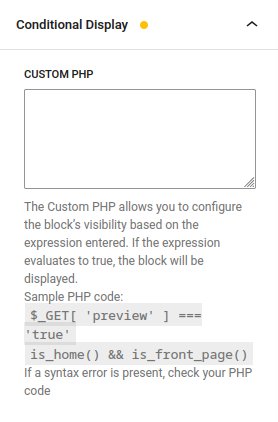
My first attempt to solve this was to simply write a function that checks whether the course expires soon, and use that as a conditional. Here is the function, which returns a boolean value:
function is_course_expiring_soon( $course_id, $user_id ) {
    // Get the course expiration date for the user
    $expiration_date = ld_course_access_expires_on( $course_id, $user_id );

    // Check if the expiration date is valid
    if ( ! $expiration_date || $expiration_date <= 0 ) {
        return false;
    }

    // Calculate the remaining days until the course expires
    $current_date = time();
    $days_remaining = ($expiration_date - $current_date) / DAY_IN_SECONDS;

    // Return true if the course expires in 10 days or less, otherwise return false
    return ($days_remaining <= 10 && $days_remaining > 0);
}
While the code itself seemed correct, the function was not being applied. I thought, “of course! I wrote a function, but I haven’t called it!” So, in the little Custom PHP box I added a function call at the end.
That didn’t work either, so I decided to start by testing the Custom PHP functionality.
The first test was simple: if I simply write a boolean value, will the conditional actually be applied? By writing “true”, I was able to always have the button appear. Turns out I can also do this by using a built-in function: by using is_bool(false) I could also replicate the behaviour and the button consistently showed up. This suggests that the problem with the Custom PHP box is that it does not allow you to define functions there, but perhaps you can call functions defined elsewhere.
Although perhaps not ideal, the solution was to define the function in functions.php (located at wp-content/themes/{theme-name}). Once there it was callable from the Custom PHP box.